
Why Fuji Speedway Is One of the Most Popular BeamNG.drive Tracks
Fuji Speedway is one of Japan's most iconic motorsport circuits, and its long main straight, sweeping corners, and dramatic elevation changes make it a natural fit for BeamNG.drive's soft-body physics engine. Unlike many racing simulators that treat tracks as rigid backdrops, BeamNG.drive's deformation and crash mechanics let you feel every kerb strike, barrier impact, and tire blowout in startling detail. The Fuji Speedway BeamNG map has therefore become one of the most sought-after community mods for players who want to experience authentic Japanese circuit driving with realistic consequences.
The real-world Fuji Speedway sits at the base of Mount Fuji in Shizuoka Prefecture, hosting everything from Super GT and the FIA World Endurance Championship to grassroots track days. Its 4.563-kilometer Grand Prix layout — featuring the famous 1.475-kilometer front straight and 16 turns — translates beautifully into the simulation environment, giving BeamNG players a taste of what professional drivers face at this legendary venue.
-

-
Fuji Speedway: The Complete 2026 Guide to Japan's Legendary Racing Circuit
What Is Fuji Speedway? Fuji Speedway is one of Japan's most iconic motorsport circuits, located at t ...
続きを見る

How to Download and Install the Fuji Speedway Map for BeamNG.drive
Finding and installing the Fuji Speedway map for BeamNG.drive is straightforward, but there are a few things to keep in mind to ensure compatibility and performance in 2026.
Where to Find the Map
The primary source for BeamNG.drive mods is the official BeamNG.drive repository on the game's forums and the in-game mod manager. Community-created Fuji Speedway maps are also shared on trusted modding sites such as BeamNG.drive Mods, ModLand, and the BeamNG section of various sim-racing communities. Always verify that you are downloading from a reputable source to avoid corrupted files or malware.
When searching, use keywords like "Fuji Speedway BeamNG," "Fuji International Speedway BeamNG map," or "FSW BeamNG mod." Some versions replicate the full Grand Prix layout, while others focus on the shorter Sprint Course or the drift course — so check the description carefully before downloading.
Installation Steps
- Step 1: Download the .zip file from a trusted source. Do not extract it.
- Step 2: Navigate to your BeamNG.drive mods folder. On Windows, this is typically located at Documents > BeamNG.drive > mods.
- Step 3: Place the .zip file directly into the mods folder.
- Step 4: Launch BeamNG.drive. The Fuji Speedway map should appear in the level selector under user-created content.
- Step 5: If the map does not load or shows visual glitches, verify that your BeamNG.drive version matches the mod's compatibility requirements. Outdated mods may need updated versions.
In-Game Mod Manager
Some Fuji Speedway maps have been approved for the in-game BeamNG.drive mod repository. Open the game, navigate to the Repository tab, and search "Fuji Speedway." If available there, installation is as simple as clicking Subscribe — the game handles everything automatically.
Fuji Speedway BeamNG Map Versions and Quality Comparison

Not all Fuji Speedway maps for BeamNG.drive are created equal. The community has produced several iterations over the years, and quality varies significantly.
Key Factors to Evaluate
- Track accuracy: The best mods replicate the real circuit's dimensions, corner radii, and elevation profiles using telemetry or laser-scan data as references. Lower-quality versions may have incorrect proportions or missing sections.
- Surface detail: High-quality mods include realistic asphalt textures, rumble strips, painted kerbs, and run-off areas. These elements directly affect BeamNG's physics calculations.
- Surrounding environment: Premium versions feature grandstands, pit buildings, forests, and — crucially — a Mount Fuji backdrop that captures the atmosphere of the real venue.
- Performance optimization: Some visually stunning maps may tank your frame rate. Look for mods that balance visual fidelity with smooth performance, especially if you are running BeamNG on mid-range hardware.
- AI path support: If you want to race against AI traffic, ensure the mod includes AI navigation paths. Without them, AI vehicles will not know how to drive the circuit.
Community ratings and comment sections are your best guide. Mods with frequent updates and active maintainers tend to offer the most polished experience.
Best Car Mods to Pair with Fuji Speedway in BeamNG
Half the fun of running Fuji Speedway in BeamNG.drive is choosing the right car. The real circuit hosts everything from GT500 machines to amateur drift cars, so there is no shortage of inspiration.
JDM Legends
For an authentic Japanese experience, look for community mods of classic JDM machines. Nissan Skyline GT-R models (R32, R33, R34), the Toyota Supra JZA80, Mazda RX-7 FD, and Honda NSX are all available as BeamNG mods and feel right at home on Fuji's tarmac. The long front straight rewards high-powered cars, making turbocharged JDM legends particularly thrilling.
Super GT and Endurance Prototypes
If you want to mimic the real-world racing that takes place at Fuji Speedway, search for Super GT-style race cars or LMP-inspired prototypes. These high-downforce machines allow you to attack the circuit's faster corners with confidence, and BeamNG's physics make every aerodynamic detail matter.
Drift-Spec Builds
Fuji Speedway's drift course is a separate, shorter layout that many mod creators include alongside the Grand Prix circuit. Lock-to-lock steering angle mods, welded-diff setups, and high-power drift-spec Silvias or AE86s are ideal for sideways action on this layout.
Driving Tips for Fuji Speedway in BeamNG.drive
BeamNG.drive's physics engine is unforgiving. Cars deform, tires blow, and suspensions collapse if you push too hard. Here are circuit-specific tips for getting the most out of Fuji Speedway.
Mastering the Main Straight and Turn 1
The 1.475-kilometer front straight is Fuji's defining feature. You will reach extremely high speeds before a heavy braking zone into Turn 1, a tight right-hander. In BeamNG, brake early and smoothly — sudden inputs at high speed can lock tires and cause catastrophic deformation. Trail-brake into the apex to rotate the car without overloading the front suspension.
Sector 2: Technical Mid-Section
Turns 3 through 10 form a technical mid-section with constant elevation change. Smooth steering inputs are critical here. BeamNG's soft-body physics mean that aggressive weight transfer can unsettle the car far more than in other sims. Focus on consistent throttle application and progressive corner entry.
Final Sector and the Panasonic Corner
The final sector includes some of Fuji's most demanding corners, including the fast Dunlop chicane area and the final sweeping bends onto the main straight. Getting a clean exit out of the last corner is essential for maximizing straight-line speed. In BeamNG, small contact with barriers here will damage your rear suspension or drivetrain, so leave a margin of error.
Crash Testing and Destruction Scenarios
Of course, many BeamNG.drive players come specifically for the crashes. Fuji Speedway's high-speed nature makes it an excellent venue for destruction scenarios. Try launching cars down the main straight at maximum speed into the Turn 1 barrier, or set up multi-car pileup scenarios using the AI path feature. BeamNG's deformation engine shines in these situations, providing endlessly entertaining results.
Fuji Speedway BeamNG vs. Assetto Corsa: Which Sim Does It Better?

Fuji Speedway is available in multiple racing simulators, and one of the most common comparisons is between BeamNG.drive and Assetto Corsa. Each platform offers a distinct experience.
- Physics focus: BeamNG excels at vehicle deformation and crash physics. Assetto Corsa prioritizes tire modeling and pure racing dynamics. If you want realistic lap times and competitive hotlapping, Assetto Corsa may have the edge. If you want to see what happens when you miss a braking point at 280 km/h, BeamNG delivers.
- Visual fidelity: Assetto Corsa's Fuji Speedway mod (and the official version in some iterations) generally offers more polished visuals, especially with Custom Shaders Patch and Sol weather mods. BeamNG maps tend to be less visually refined but compensate with interactive environments.
- Car variety: Both platforms have extensive mod libraries. However, Assetto Corsa's established modding community means you will find more laser-scanned race cars purpose-built for circuit driving.
- Fun factor: This is subjective, but BeamNG's sandbox nature — where you can spawn multiple vehicles, create traffic, and experiment with scenarios — gives Fuji Speedway a different kind of replayability that pure racing sims cannot match.
-
-
Fuji Speedway in Assetto Corsa: Track Mods, Layouts & How the Sim Compares to the Real Circuit
Why Fuji Speedway Is One of the Most Sought-After Assetto Corsa Tracks Fuji Speedway is one of Japan ...
続きを見る

From Virtual to Real: Visiting the Actual Fuji Speedway
If driving Fuji Speedway in BeamNG.drive inspires you to experience the real thing, the actual circuit is surprisingly accessible from Tokyo. Located approximately 100 kilometers southwest of central Tokyo in Oyama, Shizuoka Prefecture, Fuji Speedway offers track days, driving experiences, a motorsport museum, and regular professional racing events throughout the year.
Many JDM enthusiasts who discover Japanese circuits through sim racing eventually plan trips to Japan to see these legendary venues firsthand. Driving to Fuji Speedway by car is one of the most rewarding approaches, as the route passes through scenic areas near Mount Fuji and the Hakone region. For those who want to make the journey in an iconic JDM machine, renting a Skyline GT-R or Supra in Tokyo and driving out to the circuit adds an unforgettable layer of authenticity to the experience.
-
-
Fuji Speedway Track Map: Every Corner, Straight, and Section Explained
Understanding the Fuji Speedway Track Map Fuji Speedway is one of the most iconic motorsport circuit ...
続きを見る

Other Japanese BeamNG Maps Worth Exploring
If you enjoy the Fuji Speedway map, the BeamNG.drive modding community has recreated several other famous Japanese driving locations. Mount Akina (based on the real Mount Haruna from Initial D) is one of the most popular touge maps available, offering tight hairpins and dramatic cliff-side driving that tests BeamNG's physics in entirely different ways than a circuit environment.
-
-
Mount Akina in BeamNG.drive: How the Virtual Touge Compares to the Real Haruna Pass
Why Mount Akina Is One of BeamNG.drive's Most Popular Maps If you have ever searched for "mount akin ...
続きを見る

Other notable Japanese BeamNG maps include recreations of Suzuka Circuit, Tsukuba Circuit, and various touge mountain passes. Combined with JDM car mods, these maps allow you to build a comprehensive virtual tour of Japan's most legendary driving roads and racetracks without leaving your desk.
Troubleshooting Common Issues with the Fuji Speedway BeamNG Map

Even well-made mods can occasionally cause problems. Here are solutions to the most frequently reported issues.
- Map not appearing in level selector: Ensure the .zip file is placed directly in the mods folder without being extracted. Also check that you have not accidentally nested it inside another folder.
- Texture glitches or missing objects: This usually indicates a version mismatch. Update both BeamNG.drive and the mod to their latest versions.
- Low frame rate: Reduce your graphics settings, particularly shadow quality and draw distance. Some Fuji Speedway mods include high-polygon grandstands and environment objects that are demanding on GPUs.
- AI cars driving off-track: The mod may lack AI navigation paths, or the paths may be poorly configured. Check the mod's documentation for AI support status, or search for an AI path add-on file.
- Game crash on map load: This can occur if the mod exceeds your system's RAM capacity. Close background applications and ensure you have at least 16 GB of RAM for large circuit maps.
Keeping Your Fuji Speedway BeamNG Experience Fresh in 2026
The BeamNG.drive modding community is constantly evolving. In 2026, expect continued improvements to Fuji Speedway maps as modders incorporate new features from BeamNG's ongoing engine updates, including enhanced lighting, improved road surface physics, and better AI behavior. Follow the mod creators on forums and social media to stay informed about updates, and do not hesitate to leave feedback — community input is what drives these projects forward.
Whether you use the Fuji Speedway BeamNG map for serious lap-time attacks, spectacular crash scenarios, or simply cruising around one of Japan's most beautiful circuits, the combination of BeamNG.drive's unrivaled physics and Fuji's iconic layout guarantees hours of engaging gameplay. And who knows — your virtual laps might just inspire a real-world trip to the foothills of Mount Fuji to drive the circuit for real.
Experience Japan’s Finest JDM Adventures
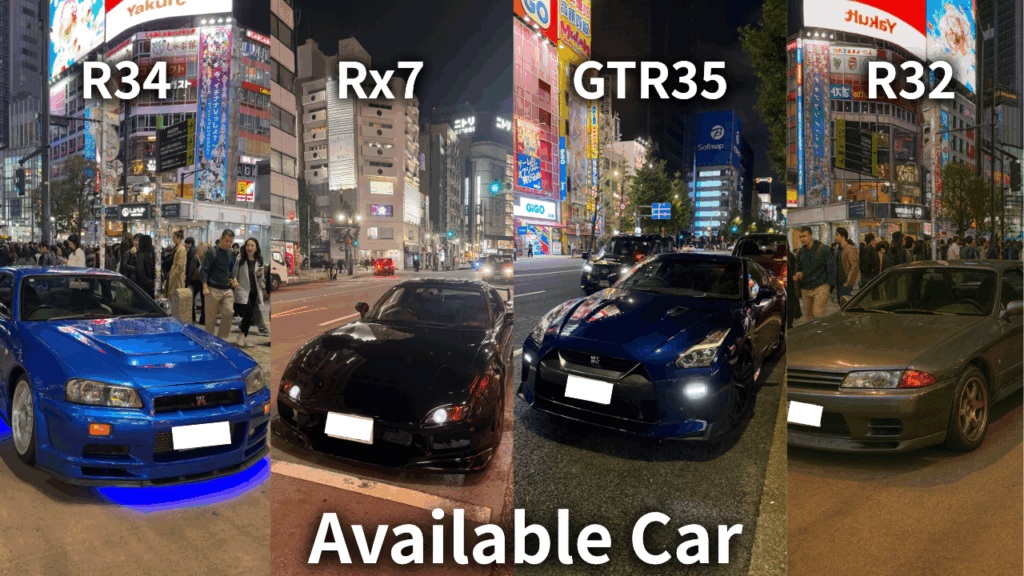
From Daikoku PA tours to JDM sports car rentals and drift experiences, we offer premium driving adventures for visitors who want more than ordinary sightseeing.
Get behind the wheel of iconic machines such as the GT-R, RX-7, and Supra, and experience Japan’s legendary car culture in the most unforgettable way. Whether you want a scenic Tokyo car experience or something more thrilling and immersive, we can guide you to the right plan.
Not sure which experience suits you best? No problem. Message us on WhatsApp and we’ll help you choose the ideal option based on your travel plans, interests, and driving experience.
Popular dates sell out quickly, so we recommend contacting us early.
Customer Reviews
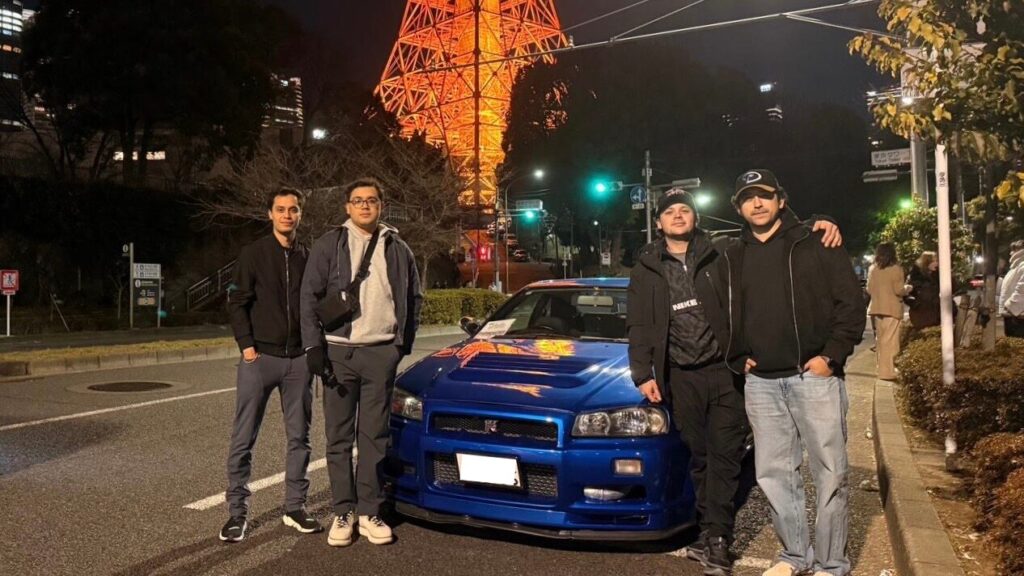
Important Information
- This is a drive tour where you drive your rental car, and our guide navigates from the seat.
- This is a self-drive tour where you drive your rental car, and our guide navigates from the passenger seat.
- The tour begins and ends at the same location (Shibuya).
- If the Daikoku Parking Area is closed, we will instead guide you to another car meet further away.
- The consultant is a cultural expert and navigator, not a taxi service.
